
分箱方案#
评分卡在开发、验证和生产中必须以同样的方式对每个变量分组和编码。 fit_spec() 一次调用即可对开发样本的所有列分箱,并计算每个分组的 WOE。得到的 BinningSpec 用同样的边界和 WOE 值对任意其他样本分组和编码。它可以保存为 JSON,并在生产环境中重新加载,且不会改变分组和编码。
每一列都用 分箱 和 证据权重与信息值 中的函数拟合,因此分箱方案中某一列的边界和 WOE 表,与单独对该列执行这些步骤的结果完全相同。确定 信贷策略 之后,分箱方案把模型带入生产,它分组的样本再用 群体稳定性指标 监控。
筛选候选变量#
使用默认设置时,每个数值列分为五个等频箱,其他列保留其标签。各列的信息值给出初步排序。如果重合的分位数使某一列的箱数少于期望值,警告会指明该列:
>>> import dataclasses
>>> import warnings
>>> import numpy as np
>>> import pandas as pd
>>> from kivi.datasets import load_bank
>>> from kivi.spec import BinningSpec, fit_spec
>>> data = load_bank()
>>> development, monitoring = data.iloc[:3000], data.iloc[3000:]
>>> with warnings.catch_warnings(record=True) as caught:
...     warnings.simplefilter("always")
...     quick = fit_spec(development.drop(columns="target"), development["target"])
>>> [str(warning.message).split(":")[0] for warning in caught]
["column 'campaign'", "column 'pdays'", "column 'previous'"]
>>> iv = pd.Series({column: table["iv"].sum() for column, table in quick.tables.items()})
>>> iv.sort_values(ascending=False).round(3).head(5)
duration    1.594
poutcome    0.423
month       0.334
contact     0.215
job         0.137
dtype: float64
quick.tables 把每一列映射到其 woe_table() 结果。除非 columns 指定了部分列,否则会拟合 frame 的所有列。请排除目标变量:如果某一列与 target Series 同名, fit_spec() 会引发错误。
哪些列会被分箱取决于其 dtype。数值列(布尔列除外)会被分箱;其他 dtype 的列(例如字符串、类别或布尔列)以其标签作为分组。若要把整数编码当作标签,请在拟合前把该列转换为 category dtype。只含数值的 object dtype 列会引发警告,因为每个不同的数值都会各成一组;若要对其分箱,请用 pandas.to_numeric 转换。
为每一列选择分箱方式#
method 、 bins 、 special 和 options 都可以是按列的 dict。这里 balance 合并到 WOE 单调为止, pdays 用决策树切分,并让 -1 编码(“之前未联系过”)单独成组, age 使用政策分段。 bins 中的边界列表按原样使用;它必须从 -inf 延伸到 inf ,以确保之后的任何取值都能落入某个箱:
>>> shortlist = ["balance", "pdays", "age", "poutcome", "contact", "housing", "job"]
>>> spec = fit_spec(
...     development,
...     development["target"],
...     columns=shortlist,
...     method={"balance": "monotonic", "pdays": "tree"},
...     bins={"balance": 4, "age": [-np.inf, 25, 35, 45, 55, 65, np.inf]},
...     special={"pdays": [-1]},
...     options={"pdays": {"min_bin_share": 0.1}},
... )
>>> spec
BinningSpec(columns=['balance', 'pdays', 'age', 'poutcome', 'contact', 'housing', 'job'])
>>> spec.edges["pdays"]
array([-inf, 100., 176., 192., 356.,  inf])
>>> spec.tables["pdays"][["total", "event_rate", "woe", "iv"]].round(3)
                total  event_rate    woe     iv
bin
-1               2475       0.092 -0.257  0.049
(-inf, 100.0]      95       0.495  2.010  0.235
(100.0, 176.0]    121       0.149  0.287  0.004
(176.0, 192.0]     53       0.509  2.069  0.140
(192.0, 356.0]    188       0.080 -0.414  0.009
(356.0, inf]       68       0.191  0.588  0.010
特殊值编码必须是数值,无穷值必须作为特殊值传入,与 bin_edges() 相同。方法 "quantile" 和 "uniform" 对应 bin_edges , "chimerge" 、 "tree" 、 "ks" 和 "monotonic" 对应有监督分箱函数。 bins 作为 bins 传给 bin_edges ,作为 max_bins 传给其他函数; options 存放它们的其余参数,例如 alpha 或 min_bin_share 。 "monotonic" 使用分箱方案的 smoothing ,因此其单调趋势在 WOE 表中同样成立。 weights 把样本权重传给每个分箱函数和 woe_table() 。
备注
fit_spec() 从不自行重新分箱。旧版的 WOEBatch 会不断减少箱数,直到 WOE 单调;这里由方法及其选项决定,需要单调的列请用 "monotonic" 拟合。
对类别列分组#
类别列保留其标签,除非 method 用 "rare" (用 category_groups() 归并稀有类别)或 "chimerge" (用 chimerge_groups() 合并事件率相近的类别)指定该列;见 类别分组 。此时 bins 是 "chimerge" 的 max_groups , special 存放 "unknown" 这类标签, options 存放分组函数的其他参数,例如 min_share 或 min_group_share 。字符串形式的 method 只作用于数值列,因此只有 dict 指定的类别列才会分组:
>>> grouped = fit_spec(
...     development,
...     development["target"],
...     columns=["job", "education", "poutcome"],
...     method={"job": "chimerge", "education": "rare", "poutcome": "chimerge"},
...     special={"job": ["unknown"]},
...     options={"education": {"min_share": 0.1}, "poutcome": {"min_group_share": 0}},
... )
>>> grouped.groups["education"]
{'primary': 'primary', 'secondary': 'secondary', 'tertiary': 'tertiary', 'unknown': 'other'}
>>> grouped.tables["poutcome"][["total", "event_rate", "woe"]].round(3)
                total  event_rate    woe
bin
unknown          2475       0.092 -0.257
failure, other    442       0.154  0.326
success            83       0.627  2.548
grouped.groups 把每个已分组的列映射到其从类别到组的 dict,即分组函数的结果, cut() 和 woe_transform() 会应用它。分组映射中没有的类别在 cut 中保留自身标签,这样 psi_table() 会把它显示为一个新组;在 woe_transform 中则按该列的 unseen 策略处理,默认会引发错误:
>>> new_job = monitoring.head(2).assign(job="astronaut")
>>> grouped.cut(new_job)["job"].tolist()
['astronaut', 'astronaut']
>>> grouped.woe_transform(new_job)
Traceback (most recent call last):
...
ValueError: column 'job': 2 value(s) have categories that its grouping does not map, ...
若要修改分组映射,先编辑 dict,再计算新分组的 WOE,然后用 dataclasses.replace 同时替换两者;它会检查 WOE 表中的每个分组都是分组映射中的组。这里把教育程度未知的客户并入初等教育程度的客户:
>>> from kivi.binning import group_categories
>>> from kivi.woe import woe_table
>>> moved = {**grouped.groups["education"], "unknown": "primary"}
>>> table = woe_table(group_categories(development["education"], moved), development["target"])
>>> edited = dataclasses.replace(
...     grouped,
...     groups={**grouped.groups, "education": moved},
...     tables={**grouped.tables, "education": table},
... )
>>> edited.tables["education"]["total"]
bin
primary       573
secondary    1512
tertiary      915
Name: total, dtype: int64
若要让新类别使用某个组(例如稀有类别组)的 WOE,请在 unseen 中用 {"group": label} 指定该组。此时 cut() 把新类别分配到该组, woe_transform() 让它们使用该组的 WOE;重新拟合该列后,它们使用的仍是该组新的 WOE。开发样本没有缺失值时,缺失值也使用该组的 WOE:
>>> to_other = fit_spec(
...     development,
...     development["target"],
...     columns=["education"],
...     method={"education": "rare"},
...     options={"education": {"min_share": 0.1}},
...     unseen={"education": {"group": "other"}},
... )
>>> new_education = monitoring.head(2).assign(education=["doctorate", "primary"])
>>> to_other.cut(new_education)["education"].tolist()
['other', 'primary']
>>> to_other.woe_transform(new_education)["education"].round(3).tolist()
[-0.411, -0.348]
对样本分组和编码#
cut() 对样本的每一列分组, woe_transform() 把每个分组替换为其 WOE。二者都按分箱方案的顺序返回其中的列,索引与样本相同:
>>> spec.cut(monitoring)[["balance", "pdays", "age", "job"]].head(3)
             balance pdays           age         job
3000  (125.7, 895.7]    -1  (35.0, 45.0]      admin.
3001   (-inf, 68.75]    -1  (35.0, 45.0]  management
3002    (895.7, inf]    -1  (25.0, 35.0]    services
>>> X_mon = spec.woe_transform(monitoring)
>>> X_mon.head(3).round(3)
      balance  pdays    age  poutcome  contact  housing    job
3000   -0.045 -0.257 -0.166    -0.257    0.206    0.333  0.052
3001   -0.587 -0.257 -0.166    -0.257   -0.917   -0.327  0.271
3002    0.358 -0.257 -0.032    -0.257    0.241   -0.327 -0.339
按数值列拟合的列在每个样本中都必须是数值 dtype。如果按字符串读入,编码 "-1" 就无法匹配其特殊值分组,因此 cut 和 woe_transform 会引发错误;请用 pandas.to_numeric 转换这样的列:
>>> spec.woe_transform(monitoring.assign(pdays=monitoring["pdays"].astype(str)))
Traceback (most recent call last):
...
ValueError: column 'pdays' was fitted as numeric but has dtype ...
分组不在该列 WOE 表中的取值(例如新类别)默认会引发错误,因此不会悄无声息地变成 NaN:
>>> new = monitoring.head(2).assign(job="astronaut")
>>> spec.woe_transform(new)
Traceback (most recent call last):
...
ValueError: column 'job': 1 group(s) are not in table, such as 'astronaut'; ...
fit_spec() 的 unseen 参数为这类取值指定 WOE,可以对所有列统一指定,也可以按列指定。开发样本中没有观测值的特殊值或区间,以及开发样本没有缺失值时的缺失值,也同样处理。分箱方案不可变,因此请用 dataclasses.replace 修改已拟合方案的策略:
>>> lenient = dataclasses.replace(spec, unseen={**spec.unseen, "job": 0.0})
>>> lenient.woe_transform(new)["job"].tolist()
[0.0, 0.0]
保留模型变量#
完成变量筛选后,在为生产环境保存分箱方案之前,只保留模型中的变量:
>>> from kivi.selection import stepwise
>>> selected = stepwise(spec.woe_transform(development), development["target"])
>>> production = spec.select(selected)
>>> production
BinningSpec(columns=['balance', 'pdays', 'poutcome', 'contact', 'housing', 'job'])
production.tables 可以直接传给 points_table() ;参见 评分卡 。
保存和加载分箱方案#
to_json() 把分箱方案写成 JSON 文本, from_json() 将其读回为相等的分箱方案,对每个样本的分组和编码完全相同。两个分箱方案的 JSON 文本相同时二者相等,文本中包含拟合它们的 kivi 版本:
>>> text = production.to_json(indent=2)
>>> loaded = BinningSpec.from_json(text)
>>> loaded == production
True
>>> loaded.woe_transform(monitoring).equals(production.woe_transform(monitoring))
True
由 kivi 较早版本保存的分箱方案仍按原样加载和编码,但它与今天做出的同一拟合结果不相等,因为相等比较包含 kivi_version 。若只比较内容,可用 dataclasses.replace 把新方案的版本赋给已保存的方案。这里的 saved 代表由 kivi 0.7.0 写出的文件:
>>> saved = dataclasses.replace(loaded, kivi_version="0.7.0")
>>> saved == production
False
>>> dataclasses.replace(saved, kivi_version=production.kivi_version) == production
True
相等比较的是每一位数字,而 NumPy 根据处理器选择向量化例程,因此在另一台计算机上重复同一拟合时,WOE 的最后一位数字可能不同,比较结果便为不相等。
兼容性 列出了以后的版本对已保存文件的承诺。
同一个分箱方案总是得到相同的文本,因此可以纳入版本控制并相互比较。标签按原样写出(包括非 ASCII 标签),因此请以 UTF-8 保存文本:
from pathlib import Path

Path("scorecard_spec.json").write_text(production.to_json(indent=2), encoding="utf-8")
production = BinningSpec.from_json(Path("scorecard_spec.json").read_text(encoding="utf-8"))
to_dict() 以 dict 给出相同的内容。每一列是 variables 中的一项:
>>> entry = production.to_dict()["variables"][1]
>>> entry["name"], entry["kind"], entry["unseen"], entry["special"]
('pdays', 'numeric', 'raise', [-1])
>>> entry["edges"]
[{'float': '-inf'}, 100.0, 176.0, 192.0, 356.0, {'float': 'inf'}]
>>> entry["table"][1]["bin"]
{'interval': [{'float': '-inf'}, 100.0], 'closed': 'right'}
>>> entry["table"][1]["woe"]
2.0098134623334465
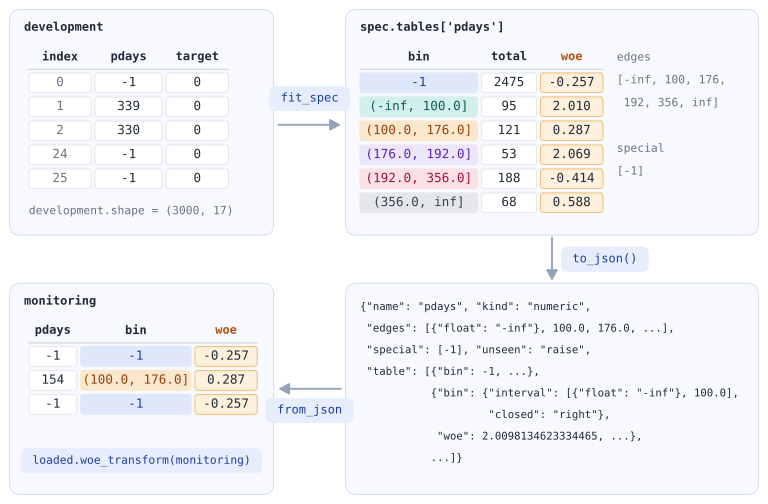
以 pdays 为例,跟踪分箱方案从拟合到投产的过程。 fit_spec 在开发样本上拟合边界和 WOE 表, to_json 按精确的边界写出它们,用 from_json 加载的方案以完全相同的方式对监控样本分组和编码。#
格式#
键 |
内容 |
|---|---|
|
始终为 |
|
格式的版本:有已分组的列时为 2,否则为 1,早期版本的 kivi 也能读取版本 1。 |
|
拟合该分箱方案的 kivi 版本。 |
|
WOE 表的平滑参数。它只记录拟合时的设置:修改它(例如用 |
|
每列一项,按顺序排列,包含 |
|
每组一项,按顺序排列,包含其标签 |
|
每个分组一项,包含其标签 |
JSON 没有无穷数值,在某些语言中也无法区分标签的类型,因此标签和边界按以下方式写出:
取值 |
JSON |
|---|---|
字符串、整数和布尔值 |
按原样写出: |
浮点数 |
带小数点或指数,例如 |
无穷数值 |
|
区间 |
|
缺失组 |
|
类别列的标签必须是字符串、整数、浮点数、布尔值或区间; fit_spec() 会拒绝其他标签,例如日期。 from_json() 会检查每个值,并拒绝文本中的 NaN 或 Infinity ,因此损坏的文件会报错,而不会编码出错误的值。
表中的区间标签来自 pandas.cut ,其边界为便于显示而经过舍入。文件改用两个精确边界写出数值列的每个区间, from_json 再把它们还原为 pandas.cut 的标签:
>>> float(production.edges["balance"][2])
125.70000000000016
>>> production.tables["balance"].index[1]
Interval(68.75, 125.7, closed='right')
>>> production.to_dict()["variables"][0]["table"][1]["bin"]
{'interval': [68.75, 125.70000000000016], 'closed': 'right'}
备注
在 kivi 之外读取该文件的软件应使用 edges 分箱,像 kivi.binning.cut() 一样先匹配 special 编码再匹配区间,并按两个边界找到每个区间对应的行。开发样本中没有观测值的区间没有对应的行。区间为左开右闭。不属于特殊值编码的无穷值不落入任何组, woe_transform() 把它视为未见分组。对于已分组的列,先在 groups 中查到每个取值的类别所属的组,再找到该组对应的行; groups 中没有列出的类别视为未见类别。