
Binning specifications#
A scorecard must group and encode every variable in the same way in development, validation and production. fit_spec() bins all the columns of a development sample in one call and measures the WOE of every group. The resulting BinningSpec groups and encodes any other sample with the same edges and WOE values. It can be saved as JSON and loaded again in production without changing the groups or the encoding.
Each column is fitted with the functions of Binning and Weight of evidence and information value, so a column of the specification has exactly the edges and table that those steps give it alone. A specification takes a model to production once the credit strategy is set, and the samples that it groups are monitored with the population stability index.
Screening the candidates#
With the defaults, every numeric column gets five quantile bins and every other column keeps its labels. The information value of each column gives a first ranking. A warning names each column whose tied quantiles leave fewer bins than requested:
>>> import dataclasses
>>> import warnings
>>> import numpy as np
>>> import pandas as pd
>>> from kivi.datasets import load_bank
>>> from kivi.spec import BinningSpec, fit_spec
>>> data = load_bank()
>>> development, monitoring = data.iloc[:3000], data.iloc[3000:]
>>> with warnings.catch_warnings(record=True) as caught:
...     warnings.simplefilter("always")
...     quick = fit_spec(development.drop(columns="target"), development["target"])
>>> [str(warning.message).split(":")[0] for warning in caught]
["column 'campaign'", "column 'pdays'", "column 'previous'"]
>>> iv = pd.Series({column: table["iv"].sum() for column, table in quick.tables.items()})
>>> iv.sort_values(ascending=False).round(3).head(5)
duration    1.594
poutcome    0.423
month       0.334
contact     0.215
job         0.137
dtype: float64
quick.tables maps each column to its woe_table() result. The columns of frame are fitted unless columns names some of them. Leave the target out: fit_spec() raises an error if a column has the name of the target series.
Which columns are binned depends on their dtype. Numeric columns, apart from booleans, are binned; columns of any other dtype, such as strings, categories or booleans, keep their labels as groups. To keep integer codes as labels, convert the column to the category dtype before fitting. A column of dtype object that holds only numbers raises a warning, because each distinct number would become a group; convert it with pandas.to_numeric to bin it.
Choosing the binning of each column#
method, bins, special and options can each be a dict by column. Here balance is merged until its WOE is monotonic, pdays is split by a decision tree with the -1 code (“not contacted before”) in its own group, and age gets policy bands. A list of edges in bins is used as given; it must run from -inf to inf, so that every future value falls into a bin:
>>> shortlist = ["balance", "pdays", "age", "poutcome", "contact", "housing", "job"]
>>> spec = fit_spec(
...     development,
...     development["target"],
...     columns=shortlist,
...     method={"balance": "monotonic", "pdays": "tree"},
...     bins={"balance": 4, "age": [-np.inf, 25, 35, 45, 55, 65, np.inf]},
...     special={"pdays": [-1]},
...     options={"pdays": {"min_bin_share": 0.1}},
... )
>>> spec
BinningSpec(columns=['balance', 'pdays', 'age', 'poutcome', 'contact', 'housing', 'job'])
>>> spec.edges["pdays"]
array([-inf, 100., 176., 192., 356.,  inf])
>>> spec.tables["pdays"][["total", "event_rate", "woe", "iv"]].round(3)
                total  event_rate    woe     iv
bin
-1               2475       0.092 -0.257  0.049
(-inf, 100.0]      95       0.495  2.010  0.235
(100.0, 176.0]    121       0.149  0.287  0.004
(176.0, 192.0]     53       0.509  2.069  0.140
(192.0, 356.0]    188       0.080 -0.414  0.009
(356.0, inf]       68       0.191  0.588  0.010
Special codes must be numbers, and infinite values must be special codes, as in bin_edges(). The methods are "quantile" and "uniform" for bin_edges and "chimerge", "tree", "ks" and "monotonic" for the supervised functions. bins is passed as bins to bin_edges and as max_bins to the others, and options holds their remaining arguments, such as alpha or min_bin_share. "monotonic" uses the smoothing of the specification, so its trend holds in the tables. weights passes sample weights to every binning function and to woe_table().
Note
fit_spec() never re-bins a column on its own. The legacy WOEBatch lowered the number of bins until the WOE was monotonic; here the method and its options decide, and a column that should be monotonic is fitted with "monotonic".
Grouping categorical columns#
A categorical column keeps its labels unless method names it with "rare", which pools rare categories with category_groups(), or "chimerge", which merges categories with similar event rates with chimerge_groups(); see Grouping categories. bins is then the max_groups of "chimerge", special holds labels such as "unknown", and options the other arguments of the grouping function, such as min_share or min_group_share. A string method applies to the numeric columns only, so a categorical column is grouped only when a dict names it:
>>> grouped = fit_spec(
...     development,
...     development["target"],
...     columns=["job", "education", "poutcome"],
...     method={"job": "chimerge", "education": "rare", "poutcome": "chimerge"},
...     special={"job": ["unknown"]},
...     options={"education": {"min_share": 0.1}, "poutcome": {"min_group_share": 0}},
... )
>>> grouped.groups["education"]
{'primary': 'primary', 'secondary': 'secondary', 'tertiary': 'tertiary', 'unknown': 'other'}
>>> grouped.tables["poutcome"][["total", "event_rate", "woe"]].round(3)
                total  event_rate    woe
bin
unknown          2475       0.092 -0.257
failure, other    442       0.154  0.326
success            83       0.627  2.548
grouped.groups maps each grouped column to its dict from category to group, the result of the grouping function, and cut() and woe_transform() apply it. A category that the grouping does not map keeps its own label in cut, so that psi_table() shows it as a new group, and gets the column’s unseen policy in woe_transform, which raises an error by default:
>>> new_job = monitoring.head(2).assign(job="astronaut")
>>> grouped.cut(new_job)["job"].tolist()
['astronaut', 'astronaut']
>>> grouped.woe_transform(new_job)
Traceback (most recent call last):
...
ValueError: column 'job': 2 value(s) have categories that its grouping does not map, ...
To change a grouping, edit the dict, measure the WOE of the new groups and replace both with dataclasses.replace, which checks that every group of the table is a group of the grouping. Here the customers with an unknown education join those with a primary education:
>>> from kivi.binning import group_categories
>>> from kivi.woe import woe_table
>>> moved = {**grouped.groups["education"], "unknown": "primary"}
>>> table = woe_table(group_categories(development["education"], moved), development["target"])
>>> edited = dataclasses.replace(
...     grouped,
...     groups={**grouped.groups, "education": moved},
...     tables={**grouped.tables, "education": table},
... )
>>> edited.tables["education"]["total"]
bin
primary       573
secondary    1512
tertiary      915
Name: total, dtype: int64
To give new categories the WOE of one of the groups, for example the group of rare categories, name it in unseen as {"group": label}. cut() then assigns them to that group, and woe_transform() gives them its WOE, which follows the group when the column is fitted again. Missing values get it as well when the development sample had none:
>>> to_other = fit_spec(
...     development,
...     development["target"],
...     columns=["education"],
...     method={"education": "rare"},
...     options={"education": {"min_share": 0.1}},
...     unseen={"education": {"group": "other"}},
... )
>>> new_education = monitoring.head(2).assign(education=["doctorate", "primary"])
>>> to_other.cut(new_education)["education"].tolist()
['other', 'primary']
>>> to_other.woe_transform(new_education)["education"].round(3).tolist()
[-0.411, -0.348]
Grouping and encoding a sample#
cut() groups every column of a sample, and woe_transform() replaces each group with its WOE. Both return the columns of the specification in its order, with the index of the sample:
>>> spec.cut(monitoring)[["balance", "pdays", "age", "job"]].head(3)
             balance pdays           age         job
3000  (125.7, 895.7]    -1  (35.0, 45.0]      admin.
3001   (-inf, 68.75]    -1  (35.0, 45.0]  management
3002    (895.7, inf]    -1  (25.0, 35.0]    services
>>> X_mon = spec.woe_transform(monitoring)
>>> X_mon.head(3).round(3)
      balance  pdays    age  poutcome  contact  housing    job
3000   -0.045 -0.257 -0.166    -0.257    0.206    0.333  0.052
3001   -0.587 -0.257 -0.166    -0.257   -0.917   -0.327  0.271
3002    0.358 -0.257 -0.032    -0.257    0.241   -0.327 -0.339
A column fitted as numeric must have a numeric dtype in every sample. Read as strings, the code "-1" would miss its special group, so cut and woe_transform raise an error instead; convert such a column with pandas.to_numeric:
>>> spec.woe_transform(monitoring.assign(pdays=monitoring["pdays"].astype(str)))
Traceback (most recent call last):
...
ValueError: column 'pdays' was fitted as numeric but has dtype ...
A value whose group is not in its column’s table, such as a new category, raises an error by default, so it never turns into a silent NaN:
>>> new = monitoring.head(2).assign(job="astronaut")
>>> spec.woe_transform(new)
Traceback (most recent call last):
...
ValueError: column 'job': 1 group(s) are not in table, such as 'astronaut'; ...
The unseen argument of fit_spec() sets a WOE for such values, for all columns or by column. The same holds for a special code or an interval that has no development observations, and for missing values when the development sample had none. A specification is immutable, so change the policy of a fitted one with dataclasses.replace:
>>> lenient = dataclasses.replace(spec, unseen={**spec.unseen, "job": 0.0})
>>> lenient.woe_transform(new)["job"].tolist()
[0.0, 0.0]
Keeping the model variables#
After variable selection, keep only the variables of the model before saving the specification for production:
>>> from kivi.selection import stepwise
>>> selected = stepwise(spec.woe_transform(development), development["target"])
>>> production = spec.select(selected)
>>> production
BinningSpec(columns=['balance', 'pdays', 'poutcome', 'contact', 'housing', 'job'])
production.tables can be passed to points_table() as it is; see Scorecard.
Saving and loading a specification#
to_json() writes the specification as JSON text, and from_json() reads it back into an equal specification that groups and encodes every sample identically. Two specifications are equal when their JSON text is the same, which includes the version of kivi that fitted them:
>>> text = production.to_json(indent=2)
>>> loaded = BinningSpec.from_json(text)
>>> loaded == production
True
>>> loaded.woe_transform(monitoring).equals(production.woe_transform(monitoring))
True
A specification saved by an earlier release of kivi loads and encodes as it did, but it differs from the same fit made today, because equality includes kivi_version. To compare the content only, give the saved specification the version of the new one with dataclasses.replace. Here saved stands for a file written by kivi 0.7.0:
>>> saved = dataclasses.replace(loaded, kivi_version="0.7.0")
>>> saved == production
False
>>> dataclasses.replace(saved, kivi_version=production.kivi_version) == production
True
Equality compares every digit, and NumPy picks its vectorized routines by the processor, so the same fit repeated on another computer can differ in the last digit of a WOE and then compare unequal.
Compatibility lists what later releases promise for saved files.
The same specification always gives the same text, so it can be kept under version control and compared. Labels are written as they are, including non-ASCII ones, so save the text as UTF-8:
from pathlib import Path

Path("scorecard_spec.json").write_text(production.to_json(indent=2), encoding="utf-8")
production = BinningSpec.from_json(Path("scorecard_spec.json").read_text(encoding="utf-8"))
to_dict() gives the same content as a dict. Each column is one entry of variables:
>>> entry = production.to_dict()["variables"][1]
>>> entry["name"], entry["kind"], entry["unseen"], entry["special"]
('pdays', 'numeric', 'raise', [-1])
>>> entry["edges"]
[{'float': '-inf'}, 100.0, 176.0, 192.0, 356.0, {'float': 'inf'}]
>>> entry["table"][1]["bin"]
{'interval': [{'float': '-inf'}, 100.0], 'closed': 'right'}
>>> entry["table"][1]["woe"]
2.0098134623334465
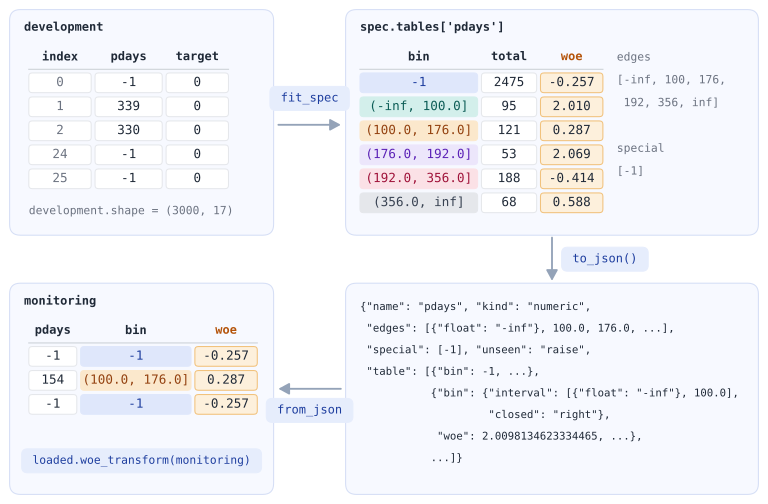
A specification from the fit to production, followed for pdays. fit_spec fits the edges and the WOE table on the development sample, to_json writes them with the exact edges, and the specification loaded with from_json groups and encodes a monitoring sample in the same way.#
The format#
Key |
Content |
|---|---|
|
Always |
|
Version of the format: 2 when a column is grouped, otherwise 1, which earlier versions of kivi read as well. |
|
Version of kivi that fitted the specification. |
|
Smoothing of the WOE tables. It records the fit: changing it, for example with |
|
One entry per column, in order, with |
|
One entry per group, in order, with its label |
|
One entry per group with its label |
JSON has no infinite numbers and does not keep the types of labels apart in every language, so labels and edges are written as follows:
Value |
JSON |
|---|---|
Strings, integers and booleans |
As they are: |
Floats |
With a decimal point or an exponent, such as |
Infinite numbers |
|
Intervals |
|
The missing group |
|
Labels of categorical columns must be strings, integers, floats, booleans or intervals; fit_spec() rejects other labels, such as dates. from_json() checks every value and rejects NaN or Infinity in the text, so a damaged file fails with a message instead of encoding wrong values.
The interval labels of a table are those of pandas.cut, which rounds their bounds for display. The file writes each interval of a numeric column with its two exact edges instead, and from_json turns them back into the labels of pandas.cut:
>>> float(production.edges["balance"][2])
125.70000000000016
>>> production.tables["balance"].index[1]
Interval(68.75, 125.7, closed='right')
>>> production.to_dict()["variables"][0]["table"][1]["bin"]
{'interval': [68.75, 125.70000000000016], 'closed': 'right'}
Note
Software outside kivi that reads the file should bin with edges, match special codes before intervals as kivi.binning.cut() does, and find the row of each interval by its two edges. An interval without development observations has no row. Intervals are closed on the right. An infinite value that is not a special code falls into no group, and woe_transform() treats it as unseen. For a grouped column, look up the category of each value in groups and then the row of its group; a category that groups does not list is unseen.